Shopboard
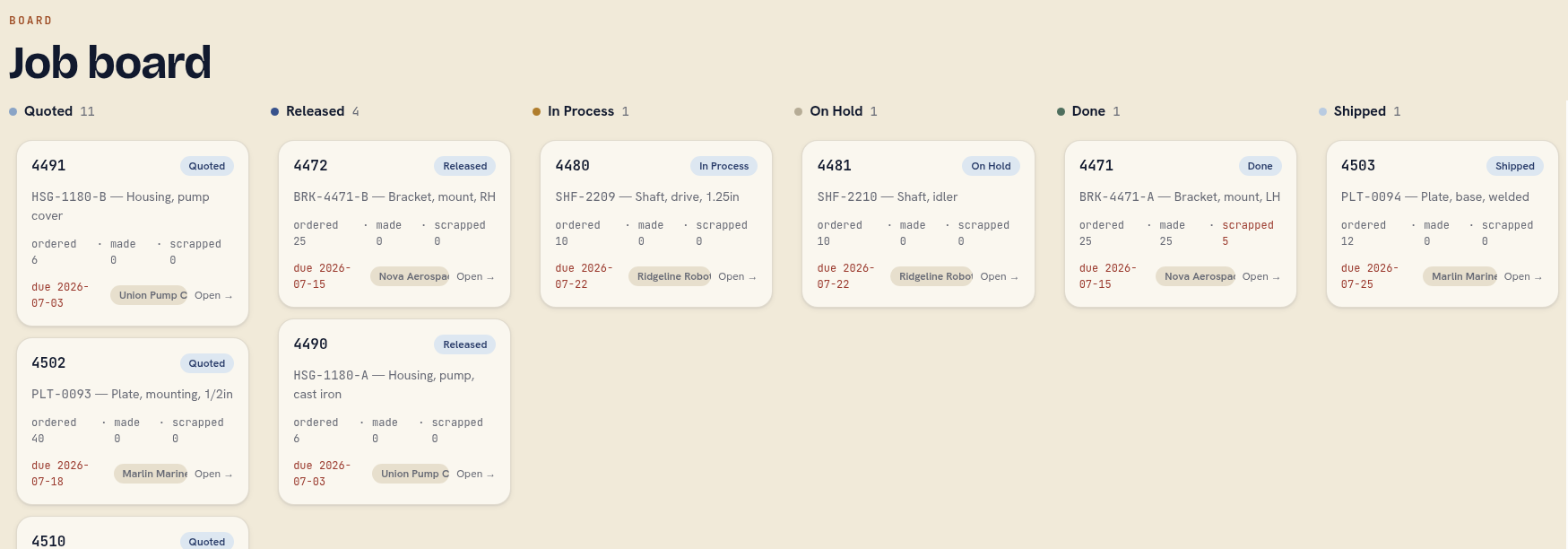
Shopboard is a job tracker for small machine shops. Operators tap Start and Done on a floor tablet, and the office sees a live board, a digital traveler for every job, and reports that answer the two questions a shop owner asks all day: what's late, and what did that job actually cost us?
Most small shops run on paper travelers, whiteboards, and someone walking the floor asking "where's job 4471?" The MES and ERP systems that would fix that are priced, staffed, and built for factories, not for a shop of five to twenty-five people. Shopboard is the path between the two. The floor interface is simple enough that an operator learns it in one shift. The office view turns those taps into a live board, a complete per-job history, and the three reports shops actually use. It installs as a single program on one small computer in the shop, keeps working when the internet doesn't, and holds onto each entry until it can deliver it.
It's sized to your shop, not scaled down from a factory system.
Who it's for
Small job shops and machine shops: CNC and manual machining, fabrication, weld, sheet metal, tool and die. Usually three to twenty-five people, high-mix low-volume work, jobs defined by a routing of steps. Saw, mill, deburr, inspect, ship.
The vocabulary is configurable, so the same shape fits finishing and coating shops, small stamping shops, cabinet and sign shops, and repair operations. Anywhere work moves through named steps at stations and the owner wants status without walking the floor.
The buyer is the owner or shop manager. The daily users are machinists and operators who did not sign up to use software. Shopboard is built for both.
On the floor
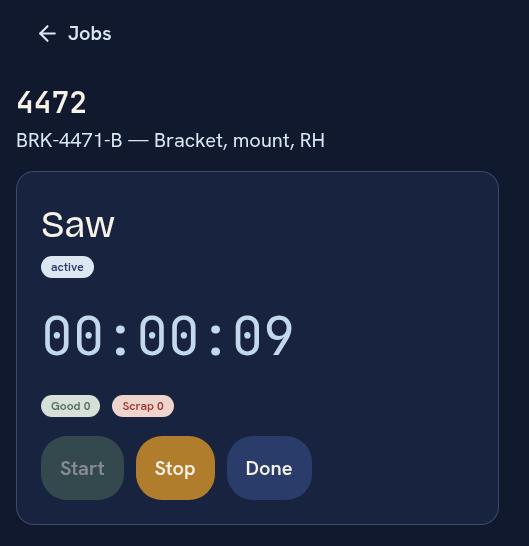
Shopboard from Boro Software supports multiple ways of working. Use the mode most compatible with your current flow:
Per Station Tablet
Each station gets a tablet, enrolled once by the office. An operator taps their name, keys a six-digit PIN, and sees the jobs assigned to that station in big text.
Job traveler Mode
"Do away with paper tickets. A commissioned tablet or phone acts as the job traveler…"
BYOD ( Bring Your Own Device )
Workers can also bring their own devices or use company provided phones. In this mode the phone or device acts like a "job traveler", accompanying the worker or the work from station to station. Device enrollment produces a code that an admin must enter into the administrative UI. Revoking a device is fast and easy.
And these all can be mixed and matched across one shop.
Offline Durability
When the network drops, everything keeps working. Every tap is saved on the device before it's sent, then delivered when the connection returns, with a visible "working offline, entries saved" banner so nobody wonders. Deliveries can't double-count and land correctly even out of order. Nothing from the floor is ever silently dropped. Anything that can't be applied is kept and shown to the office for review. The acceptance test is literal: kill the server mid-shift, log ten actions, restart, and all ten apply exactly once.
In the office
A live board shows every active job as a card with its customer, part, due date, and quantities ordered, made, and scrapped. Cards move in real time as the floor works. Drag a card to move a job between columns.
Every job carries a digital traveler: its routing, live step states, attachments that open in a tab, and a full record of every action ever taken on it, by whom and when. That record is an append-only event log. State is never edited in place. Every change, whether a floor tap, an office edit, or a board drag, is an event with an operator and a timestamp, and the board you see is a fast view derived from that log. So "who scrapped these five parts, and when" always has an answer, and a bug can't quietly corrupt the record. The whole history can be replayed to reproduce the exact same state, and there's a button that does exactly that.
The three reports that matter
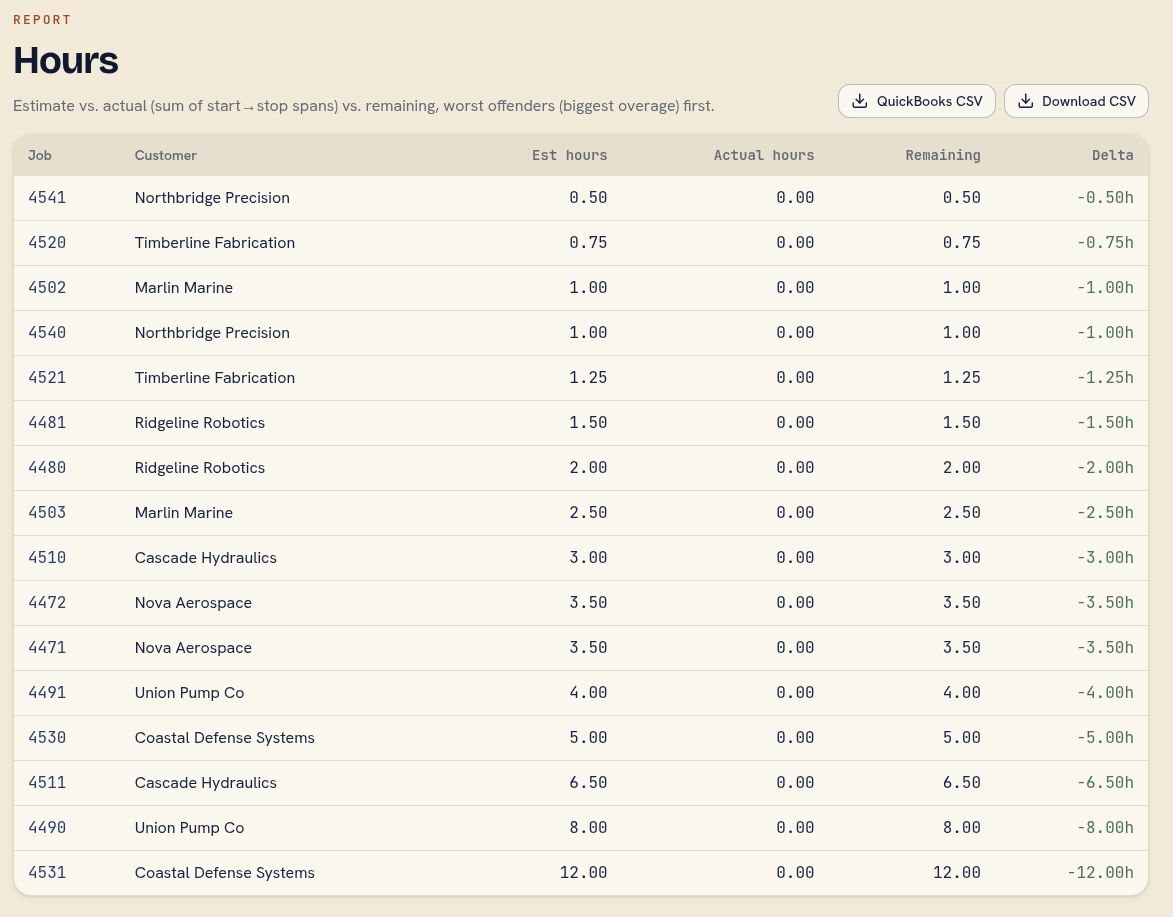
Late and at-risk jobs, so a customer never tells you first. Estimated versus actual hours, worst offenders ranked first, so you can see which jobs are eating your margin before the next quote goes out. And a WIP snapshot. Every report has a Download CSV button for the people who live in a spreadsheet.
Getting jobs onto the board is quick. The entry form is built to finish in under two minutes with a pre-filled default routing, and open jobs import from CSV with a header-mapping preview, so the first fifteen jobs are on the board the first morning.
Trivial to run
One static binary, one database file per shop, no external services, and no CDN or build toolchain to break. It runs on a fanless mini-PC on the shop's LAN or a small cloud VM. Continuous off-site backup is a standard sidecar. Twenty tablets hit the same small box, verified under load, with no per-seat pricing baked into the architecture.
Security is scaled for a shop, not a bank, but it doesn't cut the corners that matter. Office logins are real accounts with hashed passwords and sessions. Floor tablets are enrolled individually and revoked individually, so a lost tablet is dead the moment the office retires it. Operator PINs attribute work to people, and the raw PIN never leaves the tablet. Repeated bad PINs trigger a lockout.
What it is not
Shopboard tracks jobs on the floor and reports on them. On purpose, it is not these things:
- Not an ERP. No quoting, purchasing, invoicing, or accounting. It exports CSV so those systems can consume it.
- Not multi-tenant SaaS. One shop is one database file the shop owns outright, running where the shop chooses: its own LAN or its own VM.
- Not configurable to death. Vocabulary, board columns, and the default routing are configurable. The workflow shape, jobs to routed steps to start/done/scrap at stations, is opinionated by design.
Custom development and integration
Shopboard ships opinionated and self-contained, and most shops run it exactly as it comes. When a shop needs it to do more, we build that. Boro writes and maintains Shopboard, so extending it is ordinary custom development for us, done under the same senior direction as our other engagements.
Two integration points keep that clean. The append-only event log is a complete, timestamped record of everything the floor did, and every report exports CSV, so data leaves Shopboard without anyone scraping a screen. From there, the kinds of integration we can build include:
- Your own systems. Push job status and actual hours into the accounting, quoting, or scheduling software you already run, or pull open jobs from it so nobody keys the same order twice.
- Third-party services. Wire in the tools a shop's day already leans on: shipping labels, a barcode scanner at receiving, QuickBooks, a customer status page.
- Legacy systems. Read from or feed an older database or a homegrown tool you're not ready to retire, so the floor gets the new interface without a rip-and-replace.
Configuration handles the everyday fit on its own: vocabulary, board columns, and the default routing are yours to set. Custom development is for when the fit has to go deeper than settings.
Fact sheet
| Category | Shop-floor job tracking, a lightweight MES for small shops |
| Floor UX | Tablet: operator PIN, tap job, Start/Done, quantities. 64px targets, dark theme |
| Office UX | Live drag-and-drop board, a digital traveler per job, an admin screen |
| Reports | Late/at-risk · estimated vs. actual hours · WIP snapshot, each with CSV download |
| Data model | Append-only event log; full state reproducible by replay |
| Offline | On-device floor queue, idempotent sync, zero lost entries by design |
| Deployment | One static binary plus one SQLite file per shop; LAN mini-PC or small cloud VM |
| Backup | Continuous streaming replication |
| Runtime dependencies | None. No CDN, no external services |
| Load | Verified with twenty concurrent floor tablets |
| Stack | Rust, axum, SQLite in WAL mode, server-rendered templates, HTMX and SSE |
| Pricing | Fixed price, on request. Available as SaaS or on-site. |