Kumi (組), a geospatial awareness toolkit
Boro Software is looking for customers and other parties interested in deploying or using Kumi (組), Taka (鷹), or Wire-drop technology in their products or services.
- Kumi (組), meaning 'unit' or 'squad' in Japanese is our shared geospatial situational awareness system.
- Taka (鷹), meaning 'falcon', is our Cursor on Target replacement, supporting versioning, protocol extensions, and discovery
- Wire-Drop is our virtual network over user-space Wireguard, utilizing Boringtun to ensure end to end security and identity.
Customer input and feedback will help drive future development priorities. If you are interested in helping to shape Kumi, click on "Contact" to reach out to us.
Summary
Kumi is a self-hosted server that puts your people, vehicles, sensors, and equipment on one live map, over networks you do not control. It ships as a single static binary. You copy it to a machine, run two commands, and the first device is on the map within a minute of scanning a QR code. It keeps working when the network is slow, lossy or intermittent, and it sends each device only the traffic that device asked for.
Kumi started as a clean-sheet replacement for the Cursor on Target and TAK Server stack. As a full stack rewrite, it supports a clean API, a modern SDK, and a simplified, extensible wire protocol.
What it does
A team spread across a site, a valley or a coastline runs one Kumi server on a laptop or a small box. Each phone, tablet, vehicle tracker or sensor is enrolled by scanning a QR code or entering a URI that an operator mints with one command. From then on, every device publishes its position and whatever else it reports, and every device receives the positions it subscribed to, at the rate it declared, on the channels it was granted. Operators watch the same picture in a browser, manage devices and channels from a console, and can cut a device off in under a second. Kumi also exposes itself as a MCP server, allowing software agents to read and manipulate resources they have been granted access to.
Kumi can run entirely disconnected from the internet, over a 100% local network. You just need to deploy the binary and a set of map files.
Data sovereignty and security
With Kumi, the data stays on your systems. You decide what to share, you decide what to keep. Integrate with AI agents that you control.
Where it fits
Kumi is for any operation where a dispersed team needs one shared picture over a network that cannot be trusted to stay up.
Kumi's clean architecture and simple SDK make it easy to integrate with existing legacy systems, providing geographical situational awareness. Secure, simple communications, reduces exposure and risk of hacks or illegal access.
Example industries and scenarios
The following are short example user scenarios and stories, provided for illustrative purposes.
Wildland fire and forestry
Crews work in terrain where cellular coverage comes and goes and radio traffic is already saturated with voice. Kumi runs on a small cloud host the agency keeps for the season, reached over the cellular network; the division supervisor's laptop at the incident base is a browser on it. Hand crews and engines enroll at morning briefing by scanning a QR on the supervisor's screen. Through the day the supervisor watches crews move along the line, sees a dozer's position update every few seconds while a hand crew's tablet on a weak link asks for one update every ten, and knows within a minute when a crew's last position stops moving.
Utilities and telecom field crews
After a storm, a distribution utility has forty crews and a hundred trucks across three counties, and the dispatcher's picture is a whiteboard and a phone tree. Kumi runs on a small machine in the utility's data centre or cloud account, reachable from the cellular network; the storm room watches it in a browser. Trucks enroll through a QR in the morning and publish position from a phone on the dash. The dispatcher sees which crews are near the next outage, assigns a channel per feeder so each crew sees only its own work, and reads a crew's last position when its lead stops answering the radio. A contractor crew brought in for the week is enrolled the same way and revoked on Friday with one command.
Mining, quarrying and heavy construction
A quarry runs haul trucks, loaders, blasting crews and surveyors on the same ground, and the danger is a person on foot where a truck does not expect one. Kumi runs on the site office's machine. Every vehicle carries a tracker; every person on foot carries a phone. The shift supervisor's map shows both at once, with haul trucks updating every second and foot traffic every five. A blasting crew's exclusion zone is a channel and a region drawn on the map: the crew publishes to it, and the vehicles and people that need to know subscribe.
The server logs history with a retention limit, so an incident review has the positions from that hour.
Oil, gas and renewable energy
A wind farm's maintenance contractor sends technicians up towers across a hundred square miles with no cellular coverage on most of it. A Kumi server on the substation's network and a point-to-point radio link is enough. Technicians enroll before driving out. The control room sees who is on which tower, and the lone-worker rule, nobody up a tower without someone knowing where, becomes something the map enforces rather than something the radio check-in schedule hopes for. An AI agent with observe-only access files the end-of-shift location report.
Agriculture and ranching
A large ranch has staff, machinery, water points and stock spread across holdings that take an hour to cross. The manager runs Kumi on the office machine with a mesh of Wi-Fi repeaters or LoraWAN nodes at the sheds. Machinery carries a tracker; staff carry phones. During harvest the manager sees which header is where and where the chaser bins are, and during mustering sees every rider on one map. A contractor's spraying rig is enrolled for the week it is on the property, on its own channel, and revoked when it leaves.
Logistics yards, ports and rail yards
A container yard runs reach stackers, terminal tractors and inspectors across a site where a wrong turn costs twenty minutes and a collision costs a career. Kumi runs on the yard office's network. Vehicles publish position at one hertz and the yard planner's screen shows the whole site live. Inspectors on foot publish every five seconds and subscribe only to the vehicle channel. A truck driver arriving for a pickup is enrolled at the gate with a QR that expires in fifteen minutes and works once.
Event operations
A marathon has medical teams, course marshals, sweep vehicles and a race director spread over twenty-six miles of closed road, and the network is whatever the city's cellular carriers can give ten thousand spectators. Kumi runs on a cloud host rented for the weekend, reached over the cellular network, with race control watching it on a laptop. Marshals enroll at the volunteer briefing. The director sees every medical bike and sweep vehicle, and when a marshal at mile nineteen reports a runner down, the nearest medical team is the one whose dot is closest. When the cellular network chokes at the finish, devices that lose their connection reconnect without anyone doing anything. Every enrollment is revoked at the end of the day.
Mountain resorts and ski patrol
A resort's patrol covers a mountain with cellular dead zones on the back side. Kumi runs on the patrol hut's machine, on the resort's Wi-Fi backbone. Patrollers enroll at the morning meeting. Dispatch sees every patroller, and when a guest injury is reported on a run, the two patrollers nearest it are obvious. Snowcats and lift maintenance are on their own channels, visible to dispatch and to each other. A patroller who skis out of coverage on the back side reappears on the map when the next lift brings them into range.
Environmental and wildlife field research
A field station has researchers on foot across a reserve for weeks at a time, with a satellite link at the station and nothing beyond it. Kumi runs at the station. Researchers enroll before heading out and publish position when they are in range of the station's repeaters. The station manager sees who is where, and the safety rule that nobody is unaccounted for overnight is checked against the map rather than the sign-out sheet. The retained history becomes the movement record for the season.
Humanitarian and disaster relief
An aid organisation arrives in a region where the infrastructure is what failed. A Kumi server on a cloud host, reached through the base's satellite terminal, becomes the coordination picture in the first hour, before any local network has been rebuilt. Teams inside the compound use the terminal's Wi-Fi; teams in the field use whatever cellular service survived. Assessment teams enroll by QR. Logistics sees which teams have reached which villages and which vehicles are where. A partner organisation's teams are enrolled on their own channel and see only what they need. Nothing depends on headquarters: the host is the organisation's own, and the picture is the field's, not the office's.
Film and broadcast production
A location shoot spreads a unit across a valley: camera cars, picture vehicles, a drone team, a base camp and a second unit. The first assistant director runs Kumi on the production's cloud host, reached over the cellular network, or on the office laptop when the whole unit is on the unit's own Wi-Fi. Vehicles and department heads enroll in the morning. The AD sees where the camera car and the picture vehicles are on the road before calling the shot, and knows the drone team's position relative to the flight zone. When the shoot moves to the next location, every device is revoked and re-enrolled against the next day's server.
Drone and survey operations
A survey company flies a drone over a pipeline corridor with a ground crew in two vehicles and a spotter on foot. Kumi runs on the crew lead's laptop in the vehicle, and the crew's phones and the ground station join the laptop's hotspot. The drone's ground station publishes the aircraft's position through a small script, the vehicles and the spotter carry phones, and the crew lead sees the aircraft, the crew and the vehicles on one map. The spotter's phone subscribes to the aircraft at one update per second and to nothing else. The retained history is the flight and crew record for the day.
The common case
Every one of these is the same deployment: a server on one machine, devices enrolled in a minute by QR, channels that give each device what it needs and nothing else, and a map that keeps working when the link does not. The industries differ in what is on the map. The server does not care.
Architecture
Kumi is written in Rust. Rust's type system is used throughout to make whole classes of bugs unrepresentable. Rust is also a compiled language which keeps memory foot prints small and allows for efficient use of computer resources. Kumi is lean and can handle fairly large deployments from a common laptop.
Kumi has a clean module structure enforcing clear separation of concerns. This makes development fast and improves stability.
flowchart LR
    subgraph devices [Field devices]
        P[Phone or tablet]
        V[Vehicle tracker]
        S[Sensor or feeder script]
    end

    subgraph browser [Operators]
        B[Browser: map and console]
        A[AI agent over MCP]
    end

    subgraph kumi [kumi, one static binary]
        WD[wire-drop transport<br/>WireGuard, enrollment, credential push]
        WS[WebSocket over TLS]
        R[Router<br/>channels, subscriptions, rate coalescing]
        ST[(Embedded SQLite<br/>devices, invites, history)]
        API[Admin API and console]
        MCP[Agent control surface<br/>five authority tiers]
        DOC[kumi doctor]
    end

    P -- "wire-drop, UDP" --> WD
    V -- "wire-drop, UDP" --> WD
    S -- "wire-drop or WebSocket" --> WD
    B -- "HTTPS and WebSocket" --> WS
    A -- "MCP" --> MCP
    WD --> R
    WS --> R
    R <--> ST
    API <--> ST
    MCP --> API
    API --> R
How a device gets on the map
Enrollment uses wire-drop, a transport built on WireGuard / Boringtun. A device's public key is its identity. There is no certificate authority for devices, no signing request, no expiry calendar.
sequenceDiagram
    participant O as Operator
    participant K as kumi
    participant D as Device

    O->>K: kumi invite --label ALPHA-1 --channel north
    K-->>O: QR code (lobby key, address, one-time secret)
    O->>D: Show the QR
    D->>K: Dial the lobby with the secret
    K->>K: Admit to quarantine, mark pending
    O->>K: Approve (console, API or agent), or auto-approve by policy
    K->>D: Push credentials: production key, address, channels, rate
    D->>K: Join the production interface
    D->>K: Publish position
    K-->>O: ALPHA-1 appears on the map
A device awaiting approval can't do anything. It sits in a virtual 'lobby' until approved, not seeing anything until approved when it gets its final credentials.
How traffic moves
Every message carries its delivery class in the header. Things that must arrive, such as an alert or a channel assignment, are reliable. Everything else is best-effort. The router never has to guess what a message is from a type string.
Subscribers declare the rate they can afford, and the server coalesces to it at the edge. This helps ensure chatty devices don't overwhelm low end clients.
flowchart LR
    T1[Tracker, 1 Hz] --> R
    T2[Tracker, 1 Hz] --> R
    T3[Tracker, 1 Hz] --> R
    R[Router<br/>latest-wins per entity<br/>coalesce per subscriber]
    R -- "every update" --> OPS[Operations laptop<br/>declared 1 Hz]
    R -- "one per entity per 2 s" --> TAB[Tablet on a weak link<br/>declared 0.5 Hz]
    R -- "one per entity per 30 s" --> LOG[Logging script<br/>declared 30 s]
When the network is bad
Bad networks are the normal case, not the exception. Devices reconnect without re-enrolling. When UDP is blocked, on a guest Wi-Fi or a corporate network, the client fails over on its own to a relay over TLS on port 443 and keeps the same identity and the same session.
flowchart TD
    D[Device] -- "UDP open" --> WG[wire-drop over UDP 51820]
    D -- "UDP blocked" --> RL[TLS relay on 443/tcp]
    RL --> WG
    WG --> K[kumi]
    B[Browser] -- "HTTPS, WebSocket over TLS" --> K
The relay solves blocked UDP, not an unreachable server.
Browsers do not run WireGuard, so the map client and the console reach the server over HTTPS and a WebSocket on the same port. TLS is on by default.
Robust, stealthy security
All traffic is encrypted. If using Wire-drop over udp, there is no port to scan, no service to find. Packets that don't match the expected private key are simply ignored. No signal to give it away. All that is seen on the network is encrypted UDP packets. Without the private key, nothing can be done.
The tls relay, used when udp is blocked or dropped, doesn't examine the packets, it simply relays them to the wire-drop port on the other side. Nothing to scan, nothing to see, nothing to exploit.
Keys are identity. Drop the key, the client is gone, it can no longer talk.
Commissioning is in person, in place, or via URIs or QR codes containing one-time credentials. No more sharing thumb drives full of certs, making sure the right cert gets to the right device.
Operators and agents
The web console handles invites, devices, channels, connections, kicks and revocations, and shows the same map the field sees. Everything the console does, the API does, so a script can do it too.
Kumi also exposes a control surface for AI agents, with multiple authority tiers. Position data is redacted to a coarse grid unless a separate flag grants precision.
kumi doctor reads the configuration and the running server and reports the ways a deployment can be silently wrong. Doctor reduces the support burden, especially in the field, where technical help may be hard to reach.
Why it is better than the incumbent
The TAK ecosystem solved the shared-picture problem and then spent over a decade carrying compatibility. Kumi keeps the problem solution and drops the baggage.
It is a greenfield rewrite, from the ground up, keeping the good and ejecting everything else. Backwards compatibility will come later as an additional feature.
Setup is one binary, one map file, and two commands. Enrollment is a QR code or URI and an approval. The wire format is one framing with one version byte. Revocation is a key removed from an interface.
Kumi has an extensive testing framework, including core protocol fuzzing and long running soak tests to look for memory leaks and performance degradation.
Compatibility with TAK clients is planned as a separate adapter that nothing else depends on. If you don't need you don't pay for it.
What works now
Shared Map
The Kumi management console supports a shared map so the operator can see everything.
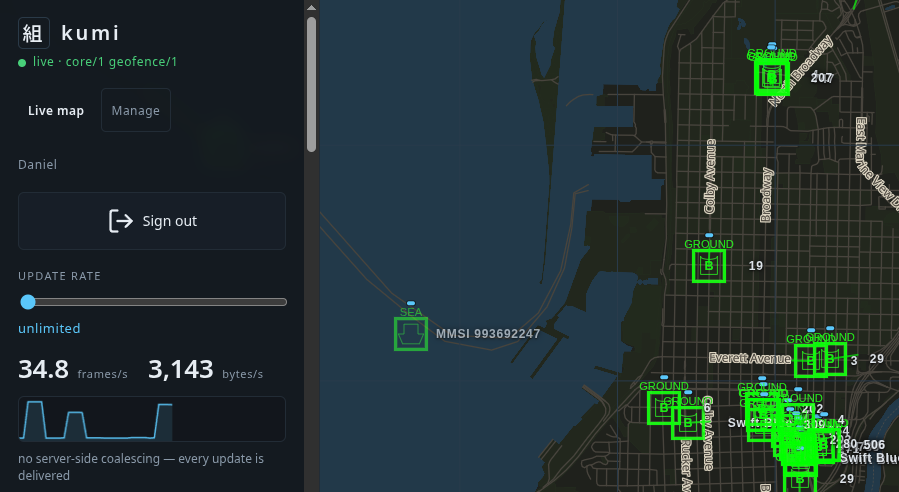
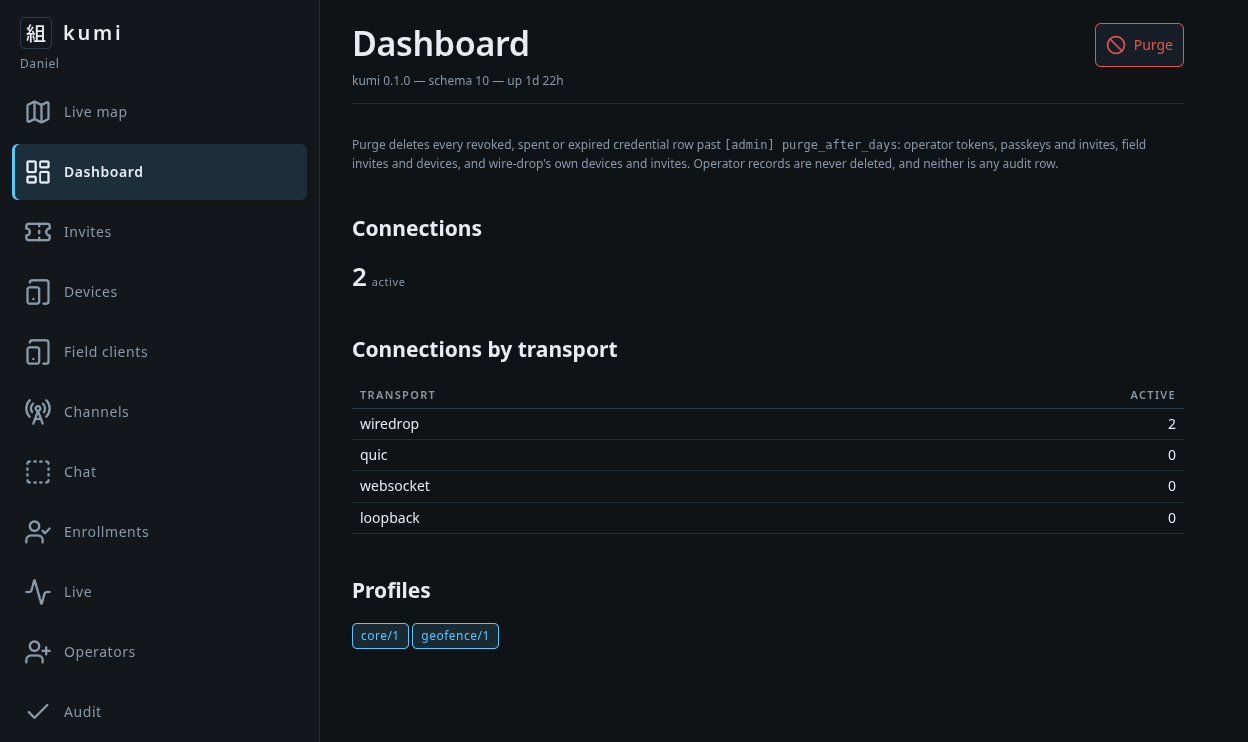
Management console
The Kumi server provides an extensive management console, simplifying administration and monitoring.
Rapid deploy field client
Kumi lets you quickly commission any tablet or phone with a QR code or URI. The embedded url points to a PWA ( Progressive Web App ) that is downloaded and installed to the user's phone or tablet. Administrators must still approve the registration request once the device pings the server.
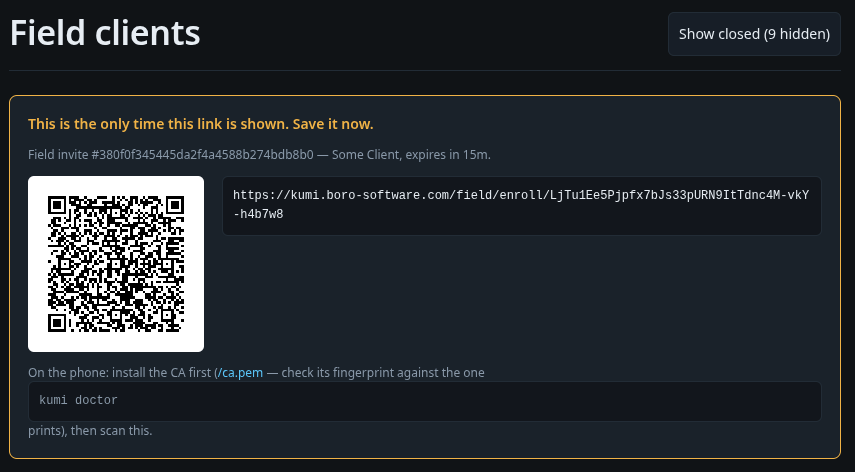
Field Clients are intended to be short lived, and can rapidly be deployed to devices. They are perfect for contractor access, or rescue work. Like any other client, revocation is fast and easy.
Other features
- Channels and Protocols
- Chat
- Streaming bi-directional updates
- MCP Server with access controls
- Operator ( user ) registration via device managed passkeys
- SDK with Rust & Python support
- Quick registration via QR Code or URI
- Lightweight relay
- End to end encryption
Polishing and refinement is ongoing. If you would like a demo of what Kumi can do for you right now, click on the contact link to start a conversation.
What is planned
Longer term ( or sooner depending on customer needs ):
- Draw routes, boundaries, and other markers with NATO Vector or geoJSON support.
- Custom marker support
- Wasm plugin support
- Integration with 3rd party workflow / dataflow engines
- Support for video and audio streams
- Native clients for various devices
- Toolkits for IoT devices
- SDK support for other languages
- Support for other protocols or technologies for connectivity, such as Meshtastic
- Supporting no-std builds of various Kumi components such as Taka and Wire-drop, so they can be used on embedded devices, robots, or drones
- Restrict operators to certain channels
- Manage server from commissioned devices
- Improved monitoring and logging support
Help us help your use case
If this sounds interesting, if you think you have a use case or need, feel free to contact us. Initial consultations are free. Lets build Kumi together.